

Description
Download WebCam Recorder – Chrome Apps, Video Recording, Webcam, Online Tool
Overview
The WebCam Recorder is a free online tool designed for users who need to capture video and still images using their webcam. It operates directly in a web browser, eliminating the need for complex installations or additional software downloads. This makes it ideal for quick, on-demand recording sessions, especially for remote communication, online learning, or personal content creation. The tool is accessible across multiple devices, supporting both Windows and Mac operating systems, and requires only a functioning webcam and stable internet connection to operate.
It is particularly suited for students, educators, freelance professionals, and casual users who need a simple and immediate way to record video messages, conduct virtual interviews, or document short tutorials. Since it runs entirely in the browser, there are no long-term commitments or system requirements beyond those of a modern web browser. The developer did not provide additional details about the company or organization behind the tool, and no information was shared regarding offline functionality or data storage policies.
Real-world usage scenarios include recording a quick introduction for a video portfolio, capturing a response to a client request, or taking a snapshot for a digital ID. The tool’s lightweight nature ensures it can be launched instantly, making it a convenient option for users who prioritize speed and simplicity over advanced editing features.
Key Features & Capabilities
- Web-Based Webcam Access – The tool allows direct access to the user’s webcam through the browser, enabling immediate video capture without installing drivers or third-party software.
- Video Recording Functionality – Users can record live video streams directly from their webcam, with the output saved in a standard format compatible with most media players.
- Photo Capture – The interface includes a snapshot feature that allows users to take still images from the live video feed, useful for creating profile pictures or documenting visual content.
- Minimal System Requirements – Designed for web browsers, the tool operates efficiently on systems with basic hardware, provided the webcam and internet connection are functional.
- Browser Compatibility – Works across modern browsers on both Windows and Mac platforms, ensuring broad accessibility for users regardless of their preferred operating system.
These features support practical applications such as recording a quick tutorial for a colleague, capturing a moment during a video call, or saving a photo for a social media profile. The absence of a local installation reduces the risk of conflicts with existing software and simplifies the user experience. Since the tool is cloud-based, users do not need to manage file storage or worry about software updates—these are handled automatically by the service.
User Interface, Workflow & Performance
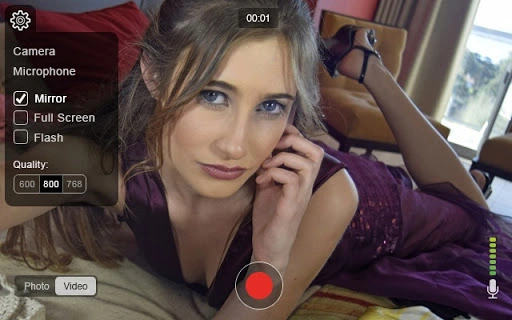
The user interface is straightforward and designed with simplicity in mind. Upon launching the tool in a web browser, users are greeted with a live preview of their webcam feed, along with clear controls for starting and stopping video recording and capturing still images. Navigation is intuitive, with minimal on-screen elements, reducing distractions and allowing users to focus on their content.
Workflow efficiency is high, as the tool requires no setup time—users can begin recording within seconds of opening the page. The interface adapts to the webcam’s resolution and frame rate, providing a smooth preview experience. However, exact performance details were not specified by the developer. Performance observations are based on general software behavior patterns, suggesting that recording quality and stability will depend on the webcam’s capabilities and internet speed.
Stability appears to be consistent for short sessions, but prolonged use may be affected by browser memory usage or network interruptions. The developer did not specify resource usage details, so CPU and RAM behavior cannot be confirmed. Users should expect minimal lag on modern systems, but older hardware may experience delays during high-resolution recording.
Compatibility & System Requirements
WebCam Recorder is compatible with both Windows and Mac operating systems, making it accessible to a wide range of users. It runs entirely within a web browser, meaning that no additional software installation is required. The tool does not rely on specific hardware beyond a built-in or connected webcam and a stable internet connection.
Exact system requirements were not listed. Compatibility information was partially provided, with only the supported platforms and the need for a webcam and internet connection mentioned. The developer did not specify the minimum browser version or required hardware specifications such as RAM, processor speed, or disk space. As such, users should ensure their device meets general web browsing standards to operate the tool effectively.
Pros and Cons
Pros
- Free to use with no hidden costs
- Runs directly in the browser—no installation required
- Simple, intuitive interface suitable for beginners
- Supports both video recording and photo capture
- Compatible with Windows and Mac systems
Cons
- No offline functionality available
- Dependent on internet connection for operation
- Limited to basic recording and capture—no editing tools included
- Exact performance and resource usage details not provided
- Developer information not disclosed
FAQ Section
Is WebCam Recorder safe to use?
Yes, the tool operates within the browser’s security framework and does not require the installation of additional software. It only accesses the webcam when explicitly permitted by the user, following standard web permissions.
Can I use WebCam Recorder without an internet connection?
No, the tool is web-based and requires an active internet connection to function. It cannot be used offline.
Does the tool support video editing?
Currently, WebCam Recorder does not include built-in video editing features. Recorded videos are saved in a standard format, and users may need to use external software for any post-production work.
Is the software available for mobile devices?
While the tool is designed for desktop browsers on Windows and Mac, it may not be fully optimized for mobile platforms. Users are advised to access it via a desktop or laptop computer for the best experience.
How often are updates released?
The developer did not provide information about update frequency. Since the tool runs in the browser, updates are typically managed automatically by the service provider.
Final Thoughts + CTA
WebCam Recorder offers a straightforward, no-cost solution for users needing to record video or take photos with their webcam. Its browser-based design ensures instant access and broad compatibility, making it a practical choice for students, remote workers, and casual users. While it lacks advanced editing tools and offline functionality, its simplicity and ease of use make it a strong contender for quick, on-the-go captures.
For those seeking a lightweight, secure, and immediate way to record video or snap images without installing software, this tool delivers on its core promise. The lack of system requirements and the free access model further enhance its appeal.
Download WebCam Recorder now and start capturing your moments with ease.
Guides & Tutorials for Video Recorder App for Chrome
How to install Video Recorder App for Chrome
- Click the Preview / Download button above.
- Once redirected, accept the terms and click Install.
- Wait for the Video Recorder App for Chrome download to finish on your device.
How to use Video Recorder App for Chrome
This software is primarily used for its core features described above. Open the app after installation to explore its capabilities.
User Reviews for Video Recorder App for Chrome 0
No reviews found





